Load audio data
Audio data is loaded using the load() function, which can read from
audio files, capture from the microphone, or accept raw audio data
(as a bytes object).
From a file
If the first argument of load() is a string or a Path, it should
refer to an existing audio file.
import auditok
region = auditok.load("audio.ogg")
If the input file contains raw (headerless) audio data, specifying audio
parameters (sampling_rate, sample_width, and channels) is required.
Additionally, if the file name does not end with ‘raw’, you should explicitly
pass audio_format="raw" to the function.
In the example below, we provide audio parameters using their abbreviated names:
region = auditok.load("audio.dat",
                      audio_format="raw",
                      sr=44100, # alias for `sampling_rate`
                      sw=2,      # alias for `sample_width`
                      ch=1      # alias for `channels`
                      )
Alternatively you can user AudioRegion to load audio data:
from auditok import AudioRegion
region = AudioRegion.load("audio.dat",
                          audio_format="raw",
                          sr=44100, # alias for `sampling_rate`
                          sw=2,     # alias for `sample_width`
                          ch=1      # alias for `channels`
                          )
From a bytes object
If the first argument is of type bytes, it is interpreted as raw audio data:
sr = 16000
sw = 2
ch = 1
data = b"\0" * sr * sw * ch
region = auditok.load(data, sr=sr, sw=sw, ch=ch)
print(region)
# alternatively you can use
region = auditok.AudioRegion(data, sr, sw, ch)
output:
AudioRegion(duration=1.000, sampling_rate=16000, sample_width=2, channels=1)
From the microphone
If the first argument is None, load() will attempt to read data from the
microphone. In this case, audio parameters, along with the max_read parameter,
are required.
sr = 16000
sw = 2
ch = 1
five_sec_audio = load(None, sr=sr, sw=sw, ch=ch, max_read=5)
print(five_sec_audio)
output:
AudioRegion(duration=5.000, sampling_rate=16000, sample_width=2, channels=1)
Skip part of audio data
If the skip parameter is greater than 0, load() will skip that specified
amount of leading audio data, measured in seconds:
import auditok
region = auditok.load("audio.ogg", skip=2) # skip the first 2 seconds
This argument must be 0 when reading data from the microphone.
Limit the amount of read audio
If the max_read parameter is > 0, load() will read at most that amount
in seconds of audio data:
import auditok
region = auditok.load("audio.ogg", max_read=5)
assert region.duration <= 5
This argument is required when reading data from the microphone.
Basic split example
In the following example, we’ll use the split() function to tokenize an
audio file.We’ll specify that valid audio events must be at least 0.2 seconds
long, no longer than 4 seconds, and contain no more than 0.3 seconds of continuous
silence. By setting a 4-second limit, an event lasting 9.5 seconds, for instance,
will be returned as two 4-second events plus a final 1.5-second event. Additionally,
a valid event may contain multiple silences, as long as none exceed 0.3 seconds.
split() returns a generator of AudioRegion objects. Each
AudioRegion can be played, saved, repeated (multiplied by an integer),
and concatenated with another region (see examples below). Note that
AudioRegion objects returned by split() include start and stop
attributes, which mark the beginning and end of the audio event relative to the
input audio stream.
import auditok

# `split` returns a generator of AudioRegion objects
audio_events = auditok.split(
    "audio.wav",
    min_dur=0.2,     # Minimum duration of a valid audio event in seconds
    max_dur=4,       # Maximum duration of an event
    max_silence=0.3, # Maximum tolerated silence duration within an event
    energy_threshold=55 # Detection threshold
)

for i, r in enumerate(audio_events):
    # AudioRegions returned by `split` have defined 'start' and 'end' attributes
    print(f"Event {i}: {r.start:.3f}s -- {r.end:.3f}")

    # Play the audio event
    r.play(progress_bar=True)

    # Save the event with start and end times in the filename
    filename = r.save("event_{start:.3f}-{end:.3f}.wav")
    print(f"event saved as: {filename}")
Example output:
Event 0: 0.700s -- 1.400s
event saved as: event_0.700-1.400.wav
Event 1: 3.800s -- 4.500s
event saved as: event_3.800-4.500.wav
Event 2: 8.750s -- 9.950s
event saved as: event_8.750-9.950.wav
Event 3: 11.700s -- 12.400s
event saved as: event_11.700-12.400.wav
Event 4: 15.050s -- 15.850s
event saved as: event_15.050-15.850.wav
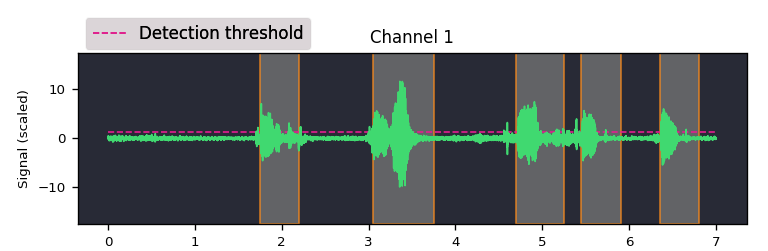
Split and plot
Visualize audio signal and detections:
import auditok
region = auditok.load("audio.wav") # returns an AudioRegion object
regions = region.split_and_plot(...) # or just region.splitp()
output figure:
Split an audio stream and re-join (glue) audio events with silence
The following code detects audio events within an audio stream, then insert 1 second of silence between them to create an audio with pauses:
# Create a 1-second silent audio region
# Audio parameters must match the original stream
from auditok import split, make_silence
silence = make_silence(duration=1,
                       sampling_rate=16000,
                       sample_width=2,
                       channels=1)
events = split("audio.wav")
audio_with_pauses = silence.join(events)
Alternatively, use split_and_join_with_silence:
from auditok import split_and_join_with_silence
audio_with_pauses = split_and_join_with_silence(silence_duration=1, input="audio.wav")
Read audio data from the microphone and perform real-time event detection
If the first argument of split() is None, audio data is read from the
microphone (requires pyaudio):
import auditok

sr = 16000
sw = 2
ch = 1
eth = 55 # alias for energy_threshold, default value is 50

try:
    for region in auditok.split(input=None, sr=sr, sw=sw, ch=ch, eth=eth):
        print(region)
        region.play(progress_bar=True) # progress bar requires `tqdm`
except KeyboardInterrupt:
     pass
split() will continue reading audio data until you press Ctrl-C. To read
a specific amount of audio data, pass the desired number of seconds using the
max_read argument.
Access recorded data after split
Using a Recorder object you can access to audio data read from a file
of from the mirophone. With the following code press Ctrl-C to stop recording:
import auditok

sr = 16000
sw = 2
ch = 1
eth = 55 # alias for energy_threshold, default value is 50

rec = auditok.Recorder(input=None, sr=sr, sw=sw, ch=ch)
events = []

try:
    for region in auditok.split(rec, sr=sr, sw=sw, ch=ch, eth=eth):
        print(region)
        region.play(progress_bar=True)
        events.append(region)
except KeyboardInterrupt:
     pass

rec.rewind()
full_audio = load(rec.data, sr=sr, sw=sw, ch=ch)
# alternatively you can use
full_audio = auditok.AudioRegion(rec.data, sr, sw, ch)
full_audio.play(progress_bar=True)
Recorder also accepts a max_read argument.
Working with AudioRegions
In the following sections, we will review several operations
that can be performed with AudioRegion objects.
Basic region information
import auditok
region = auditok.load("audio.wav")
len(region) # number of audio samples int the regions, one channel considered
region.duration # duration in seconds
region.sampling_rate # alias `sr`
region.sample_width # alias `sw`
region.channels # alias `ch`
When an audio region is returned by the split() function, it includes defined
start and end attributes that refer to the beginning and end of the audio
event relative to the input audio stream.
Concatenate regions
import auditok
region_1 = auditok.load("audio_1.wav")
region_2 = auditok.load("audio_2.wav")
region_3 = region_1 + region_2
This is particularly useful when you want to join regions returned by the
split() function:
import auditok
regions = auditok.load("audio.wav").split()
gapless_region = sum(regions)
Repeat a region
Multiply by a positive integer:
import auditok
region = auditok.load("audio.wav")
region_x3 = region * 3
Split one region into N regions of equal size
Divide by a positive integer (this is unrelated to silence-based tokenization!):
import auditok
region = auditok.load("audio.wav")
regions = regions / 5
assert sum(regions) == region
Note that if an exact split is not possible, the last region may be shorter than the preceding N-1 regions.
Slice a region by samples, seconds or milliseconds
Slicing an AudioRegion can be useful in various situations.
For example, you can remove a fixed-length portion of audio data from
the beginning or end of a region, or crop a region by an arbitrary amount
as a data augmentation strategy.
The most accurate way to slice an AudioRegion is by using indices
that directly refer to raw audio samples. In the following example, assuming
the audio data has a sampling rate of 16000, you can extract a 5-second
segment from the main region, starting at the 20th second, as follows:
import auditok
region = auditok.load("audio.wav")
start = 20 * 16000
stop = 25 * 16000
five_second_region = region[start:stop]
This allows you to start and stop at any audio sample within the region. Similar
to a list, you can omit either start or stop, or both. Negative
indices are also supported:
import auditok
region = auditok.load("audio.wav")
start = -3 * region.sr # `sr` is an alias of `sampling_rate`
three_last_seconds = region[start:]
While slicing by raw samples offers flexibility, using temporal indices is
often more intuitive. You can achieve this by accessing the millis or seconds
views of an AudioRegion (or using their shortcut aliases ms, sec, or s).
With the millis view:
import auditok
region = auditok.load("audio.wav")
five_second_region = region.millis[5000:10000]
# or
five_second_region = region.ms[5000:10000]
or with the seconds view:
import auditok
region = auditok.load("audio.wav")
five_second_region = region.seconds[5:10]
# or
five_second_region = region.sec[5:10]
# or
five_second_region = region.s[5:10]
seconds indices can also be floats:
import auditok
region = auditok.load("audio.wav")
five_second_region = region.seconds[2.5:7.5]
Export an AudioRegion as a numpy array
from auditok import load, AudioRegion
audio = load("audio.wav") # or use `AudioRegion.load("audio.wav")`
x = audio.numpy()
assert x.shape[0] == audio.channels
assert x.shape[1] == len(audio)