
Load audio data#
Audio data is loaded using the load() function, which can read from
audio files, capture from the microphone, or accept raw audio data
(as a bytes object).
From a file#
If the first argument of load() is a string or a Path, it should
refer to an existing audio file.
import auditok
region = auditok.load("audio.ogg")
If the input file contains raw (headerless) audio data, specifying audio
parameters (sampling_rate, sample_width, and channels) is required.
Additionally, if the file name does not end with ‘raw’, you should explicitly
pass audio_format="raw" to the function.
In the example below, we provide audio parameters using their abbreviated names:
region = auditok.load("audio.dat",
                      audio_format="raw",
                      sr=44100, # alias for `sampling_rate`
                      sw=2,     # alias for `sample_width`
                      ch=1      # alias for `channels`
                      )
Alternatively you can use AudioRegion to load audio data:
from auditok import AudioRegion
region = AudioRegion.load("audio.dat",
                          audio_format="raw",
                          sr=44100, sw=2, ch=1)
On-the-fly format conversion#
When loading non-WAV audio via ffmpeg, you can have ffmpeg convert the audio
on the fly by passing sr, sw, and/or ch parameters. This is
particularly useful for ML pipelines (e.g., Whisper expects 16 kHz mono):
region = auditok.load("audio.mp3", sr=16000, ch=1)
From a bytes object#
If the first argument is of type bytes, it is interpreted as raw audio data:
sr = 16000
sw = 2
ch = 1
data = b"\0" * sr * sw * ch
region = auditok.load(data, sr=sr, sw=sw, ch=ch)
print(region)
output:
AudioRegion(duration=1.000, sampling_rate=16000, sample_width=2, channels=1)
From the microphone#
If the first argument is None, load() will attempt to read data from the
microphone. In this case, audio parameters, along with the max_read parameter,
are required.
sr = 16000
sw = 2
ch = 1
five_sec_audio = auditok.load(None, sr=sr, sw=sw, ch=ch, max_read=5)
print(five_sec_audio)
output:
AudioRegion(duration=5.000, sampling_rate=16000, sample_width=2, channels=1)
Skip part of audio data#
If the skip parameter is greater than 0, load() will skip that specified
amount of leading audio data, measured in seconds:
import auditok
region = auditok.load("audio.ogg", skip=2) # skip the first 2 seconds
This argument must be 0 when reading data from the microphone.
Limit the amount of read audio#
If the max_read parameter is > 0, load() will read at most that amount
in seconds of audio data:
import auditok
region = auditok.load("audio.ogg", max_read=5)
assert region.duration <= 5
This argument is required when reading data from the microphone.
Basic split example#
In the following example, we’ll use the split() function to tokenize an
audio file. We’ll specify that valid audio events must be at least 0.2 seconds
long, no longer than 4 seconds, and contain no more than 0.3 seconds of continuous
silence. By setting a 4-second limit, an event lasting 9.5 seconds, for instance,
will be returned as two 4-second events plus a final 1.5-second event. Additionally,
a valid event may contain multiple silences, as long as none exceed 0.3 seconds.
split() returns a generator of AudioRegion objects. Each
AudioRegion can be played, saved, repeated (multiplied by an integer),
and concatenated with another region (see examples below). Note that
AudioRegion objects returned by split() include start and end
attributes, which mark the beginning and end of the audio event relative to the
input audio stream.
import auditok

# `split` returns a generator of AudioRegion objects
audio_events = auditok.split(
    "audio.wav",
    min_dur=0.2,     # Minimum duration of a valid audio event in seconds
    max_dur=4,       # Maximum duration of an event
    max_silence=0.3, # Maximum tolerated silence duration within an event
    energy_threshold=55 # Detection threshold
)

for i, r in enumerate(audio_events):
    # AudioRegions returned by `split` have defined 'start' and 'end' attributes
    print(f"Event {i}: {r.start:.3f}s -- {r.end:.3f}s")

    # Play the audio event
    r.play(progress_bar=True)

    # Save the event with start and end times in the filename
    filename = r.save("event_{start:.3f}-{end:.3f}.wav")
    print(f"Event saved as: {filename}")
Example output:
Event 0: 0.700s -- 1.400s
Event saved as: event_0.700-1.400.wav
Event 1: 3.800s -- 4.500s
Event saved as: event_3.800-4.500.wav
Event 2: 8.750s -- 9.950s
Event saved as: event_8.750-9.950.wav
Event 3: 11.700s -- 12.400s
Event saved as: event_11.700-12.400.wav
Event 4: 15.050s -- 15.850s
Event saved as: event_15.050-15.850.wav
To detect events of arbitrary length (no truncation), pass max_dur=None:
events = auditok.split("audio.wav", max_dur=None)
Automatic energy threshold#
Picking a good energy_threshold by hand requires knowing the
recording’s noise floor and level. Pass energy_threshold="auto" and
split() estimates the threshold from the energy distribution of
the input’s analysis windows:
events = auditok.split("audio.wav", energy_threshold="auto")
Two estimation methods are available, selected with the validator
parameter:
# "otsu" (the default behind "auto"): splits the energy histogram in
# two classes; a balanced choice for audio with clear pauses
events = auditok.split("audio.wav", validator="otsu")

# "percentile": noise floor (10th percentile) + 6 dB margin; more
# recall-oriented, works well for dense or far-field speech
events = auditok.split("audio.wav", validator="percentile")

# "pXX" is the percentile method reading the noise floor at the XXth
# percentile (XX in [1, 99]; "percentile" == "p10"). Useful to bias
# detection on material without a clear noise floor (e.g., music):
# higher percentiles give higher, more selective thresholds
events = auditok.split("audio.wav", validator="p20")
trim and fix_pauses accept the same values. For offline input
(a file, bytes or an AudioRegion), the whole signal is used
for estimation; compressed input is decoded only once (the decoded audio
is kept in memory and tokenized from there).
For live input (microphone, standard input), the threshold is
calibrated on the first calibration_dur seconds of the stream
(default 3) and then kept unchanged. The calibration audio is buffered
and replayed to the detector, so events starting during calibration are
not lost:
# calibrated threshold on microphone input
events = auditok.split(
    None, sr=16000, sw=2, ch=1, max_read=60, energy_threshold="auto"
)

# longer calibration, custom guardrail
events = auditok.split(
    None, sr=16000, sw=2, ch=1, max_read=60,
    validator="percentile", calibration_dur=5, min_energy_threshold=45,
)
Live calibration is guarded by min_energy_threshold (default 40 dB):
if the calibration window contains only background noise — a PC fan, air
conditioning, a fridge — an unguarded estimator would place the
threshold inside the noise and turn it into detections. The guardrail
clamps the estimate from below:
threshold = max(min_energy_threshold, estimate). The 40 dB default
sits above common background noise at typical microphone gains; raise
it for noisy environments or hot microphones, lower it for quiet setups
where speech itself is faint. The parameter only applies when
calibrating on live input — offline estimation is protected differently
(digitally silent windows are excluded from the estimate).
Automatic estimation is entirely optional. If you know a threshold that works for your audio and setup — for example, one you found by experimenting — pass it explicitly and no estimation takes place:
events = auditok.split("audio.wav", energy_threshold=55)
For full control (e.g., a custom percentile or margin), estimate the threshold yourself and pass the resulting value:
from auditok.signal import compute_frame_energies, estimate_energy_threshold

region = auditok.load("audio.wav")
energies = compute_frame_energies(
    region.data, region.sw, region.ch, frame_samples=int(0.05 * region.sr)
)
threshold = estimate_energy_threshold(
    energies, method="percentile", percentile=20.0, margin=9.0
)
events = auditok.split(region, energy_threshold=threshold)
Using the WebRTC VAD as frame decider#
The energy validator accepts any audio with enough energy — including
music, keyboard noise or hums. To detect speech specifically, use the
WebRTC voice activity detector as the frame-level decider
(pip install auditok[webrtcvad]); auditok’s event machinery
(min_dur, max_silence bridging, leading/trailing silence
handling) still shapes the frame decisions into events:
# aggressiveness mode in [0, 3]; "webrtc" alone means mode 1.
# 0/1 are recommended for far-field or noisy audio, 2 for clean
# close-talk audio; higher modes reject more audio as non-speech
speech_events = auditok.split("audio.wav", validator="webrtc:1")
As a frame validator, the WebRTC VAD may work better with a smaller
max_silence value than the default (0.3 s) — typically
max_silence=0.1 (-s 0.1 on the command line).
The WebRTC VAD also works with live input. Unlike automatic energy thresholding, which calibrates a threshold on the first seconds of the stream and then keeps it, the VAD needs no calibration phase: it decides frame by frame, adapting its noise model as audio streams in:
# detect speech from the microphone
speech_events = auditok.split(
    None, sr=16000, sw=2, ch=1, max_read=30, validator="webrtc"
)
For full control (subframe duration, decision aggregation, channel selection), construct the validator explicitly:
from auditok.validators import WebRTCVADValidator

validator = WebRTCVADValidator(
    16000, 2, 1, mode=2, subframe_dur=0.03, aggregation="any"
)
speech_events = auditok.split("audio.wav", validator=validator)
Note that the WebRTC VAD requires a sampling rate of 8000, 16000, 32000 or 48000 Hz, and that a validator instance is stateful: create a new one per stream or file.
Improving detection boundaries#
Energy-based detection can clip the natural onset and fade-out of speech, where
the signal rises gradually from or falls back into silence. The
max_leading_silence and max_trailing_silence parameters extend detection
boundaries to capture these transitions:
events = auditok.split(
    "audio.wav",
    max_leading_silence=0.2,   # prepend up to 200ms before each event
    max_trailing_silence=0.15, # keep up to 150ms of silence after each event
)
Values of 0.1 – 0.3 seconds typically work well. These parameters are available
on split(), trim(), fix_pauses(), and their AudioRegion
method counterparts, as well as on the command line (-l / --max-leading-silence
and -g / --max-trailing-silence).
max_silence and max_trailing_silence control two different things:
max_silencedecides when an event ends — it is the longest run of silence tolerated inside an event before the event boundary is closed.max_trailing_silencedecides how much silence is kept at the end of the delivered event, as perceptual padding around the natural fade-out.
The accepted values for max_trailing_silence are:
None(default): keep all trailing silence up tomax_silence(no trimming, no extension).0: drop all trailing silence.A value
<= max_silence: trim trailing silence to that duration.A value
> max_silence: once the event boundary is decided (atmax_silence), continue collecting silent frames past the boundary up tomax_trailing_silencetotal. Collection stops early if a valid frame appears (in which case the current event is delivered with its accumulated trailing silence and a new event starts immediately from that frame, so separate events are not merged) or if the audio ends.
This decoupling is useful when you want short, well-segmented events but
still need enough fade-out padding to sound natural. A small max_silence
keeps events tight, while a larger max_trailing_silence adds the fade-out:
# Close events quickly (100ms of silence ends an event), but keep up to
# 400ms of trailing silence so each event has a natural fadeout.
events = auditok.split(
    "speech.wav",
    max_silence=0.1,
    max_trailing_silence=0.4,
)
Trim silence#
trim() removes leading and trailing silence from audio, keeping everything
between the first and last detected events (including any internal silence):
import auditok

trimmed = auditok.trim("audio.wav", energy_threshold=55)
trimmed.save("trimmed.wav")
It can also be used as an AudioRegion method:
region = auditok.load("audio.wav")
trimmed = region.trim(energy_threshold=55)
trim() returns an empty AudioRegion (zero duration) if no audio
activity is detected.
Normalize pauses#
fix_pauses() detects all audio events, then joins them with a fixed
duration of silence between each, discarding any excess silence:
import auditok

# Replace all pauses with exactly 0.5s of silence
cleaned = auditok.fix_pauses("audio.wav", silence_duration=0.5)
cleaned.save("cleaned.wav")
This is useful for normalizing recordings with inconsistent pause lengths while preserving the original audio content.
Split and plot#
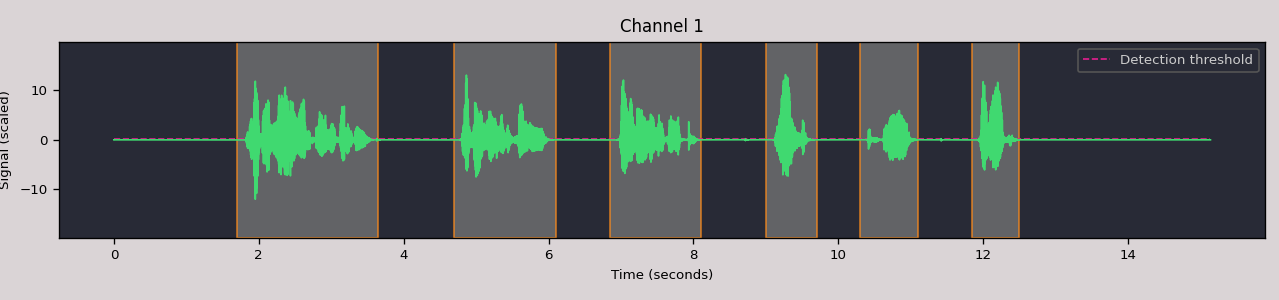
Visualize the audio signal with detected events using
AudioRegion.split_and_plot() (or its alias splitp()):
import auditok

region = auditok.load("audio.wav")
events = region.split_and_plot(energy_threshold=55)
# or: events = region.splitp(energy_threshold=55)
Interactive widget in Jupyter#
Pass interactive=True to get an HTML5/Canvas/WebAudio widget with clickable
detection regions and inline playback:
events = region.split_and_plot(interactive=True, energy_threshold=55)
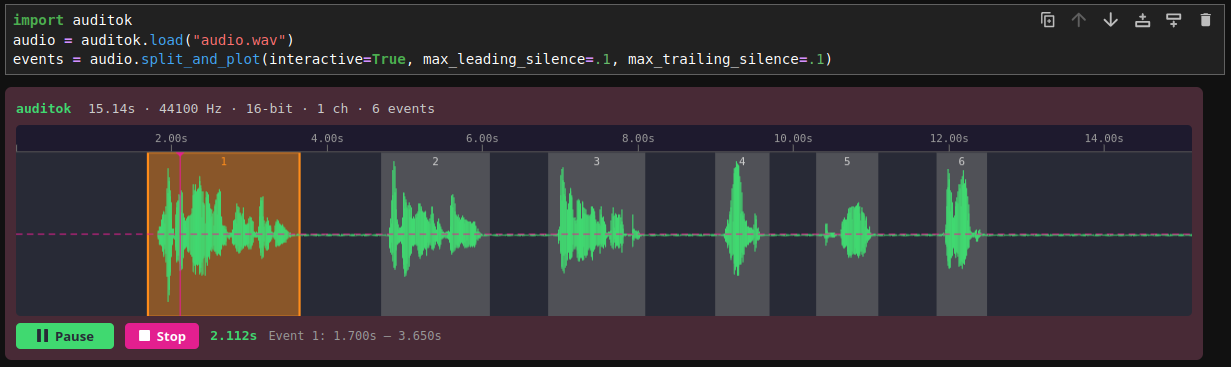
The widget includes a Canvas waveform with detection highlights, a time ruler with click-to-seek, Play/Pause/Stop controls, and live timestamp display. If not running in a notebook, it falls back to the matplotlib plot.
Read audio data from the microphone#
If the first argument of split() is None, audio data is read from the
microphone (requires sounddevice):
import auditok

try:
    for region in auditok.split(input=None, eth=55):
        print(region)
        region.play(progress_bar=True) # progress bar requires `tqdm`
except KeyboardInterrupt:
     pass
split() will continue reading audio data until you press Ctrl-C. To read
a specific amount of audio data, pass the desired number of seconds using the
max_read argument.
Working with AudioRegions#
In the following sections, we will review several operations
that can be performed with AudioRegion objects.
Basic region information#
import auditok
region = auditok.load("audio.wav")
len(region) # number of audio samples in the region, one channel considered
region.duration # duration in seconds
region.sampling_rate # alias `sr`
region.sample_width # alias `sw`
region.channels # alias `ch`
When an audio region is returned by the split() function, it includes defined
start and end attributes that refer to the beginning and end of the audio
event relative to the input audio stream.
Concatenate regions#
import auditok
region_1 = auditok.load("audio_1.wav")
region_2 = auditok.load("audio_2.wav")
region_3 = region_1 + region_2
This is particularly useful when you want to join regions returned by the
split() function:
import auditok
regions = auditok.load("audio.wav").split()
gapless_region = sum(regions)
Repeat a region#
Multiply by a positive integer:
import auditok
region = auditok.load("audio.wav")
region_x3 = region * 3
Split one region into N regions of equal size#
Divide by a positive integer (this is unrelated to silence-based tokenization!):
import auditok
region = auditok.load("audio.wav")
regions = region / 5
assert sum(regions) == region
Note that if an exact split is not possible, the last region may be shorter than the preceding N-1 regions.
Slice a region by samples, seconds, or milliseconds#
Slicing an AudioRegion can be useful in various situations.
For example, you can remove a fixed-length portion of audio data from
the beginning or end of a region, or crop a region by an arbitrary amount
as a data augmentation strategy.
The most accurate way to slice an AudioRegion is by using indices
that directly refer to raw audio samples:
import auditok
region = auditok.load("audio.wav")
start = 20 * 16000
stop = 25 * 16000
five_second_region = region[start:stop]
Similar to a list, you can omit either start or stop, or both.
Negative indices are also supported:
three_last_seconds = region[-3 * region.sr:]
While slicing by raw samples offers flexibility, using temporal indices is
often more intuitive. Use the seconds or millis views (or their
aliases sec/s and ms):
# Slice by seconds (supports floats)
five_second_region = region.sec[5:10]
sub_region = region.sec[2.5:7.5]

# Slice by milliseconds
five_second_region = region.ms[5000:10000]
Export as a numpy array#
import auditok
audio = auditok.load("audio.wav")
x = audio.numpy()
assert x.shape[0] == audio.channels
assert x.shape[1] == len(audio)
Playback#
import auditok
region = auditok.load("audio.wav")
region.play(progress_bar=True)  # progress bar requires `tqdm`
In Jupyter notebooks, AudioRegion objects render as inline HTML5 audio
players automatically.
Save audio#
import auditok
region = auditok.load("audio.wav")

# Save as WAV
region.save("output.wav")

# Save with template placeholders (useful for split results)
region.save("event_{start:.3f}-{end:.3f}.wav")

# Save as compressed format (requires ffmpeg)
region.save("output.ogg")
region.save("output.mp3", audio_bitrate="192k")